




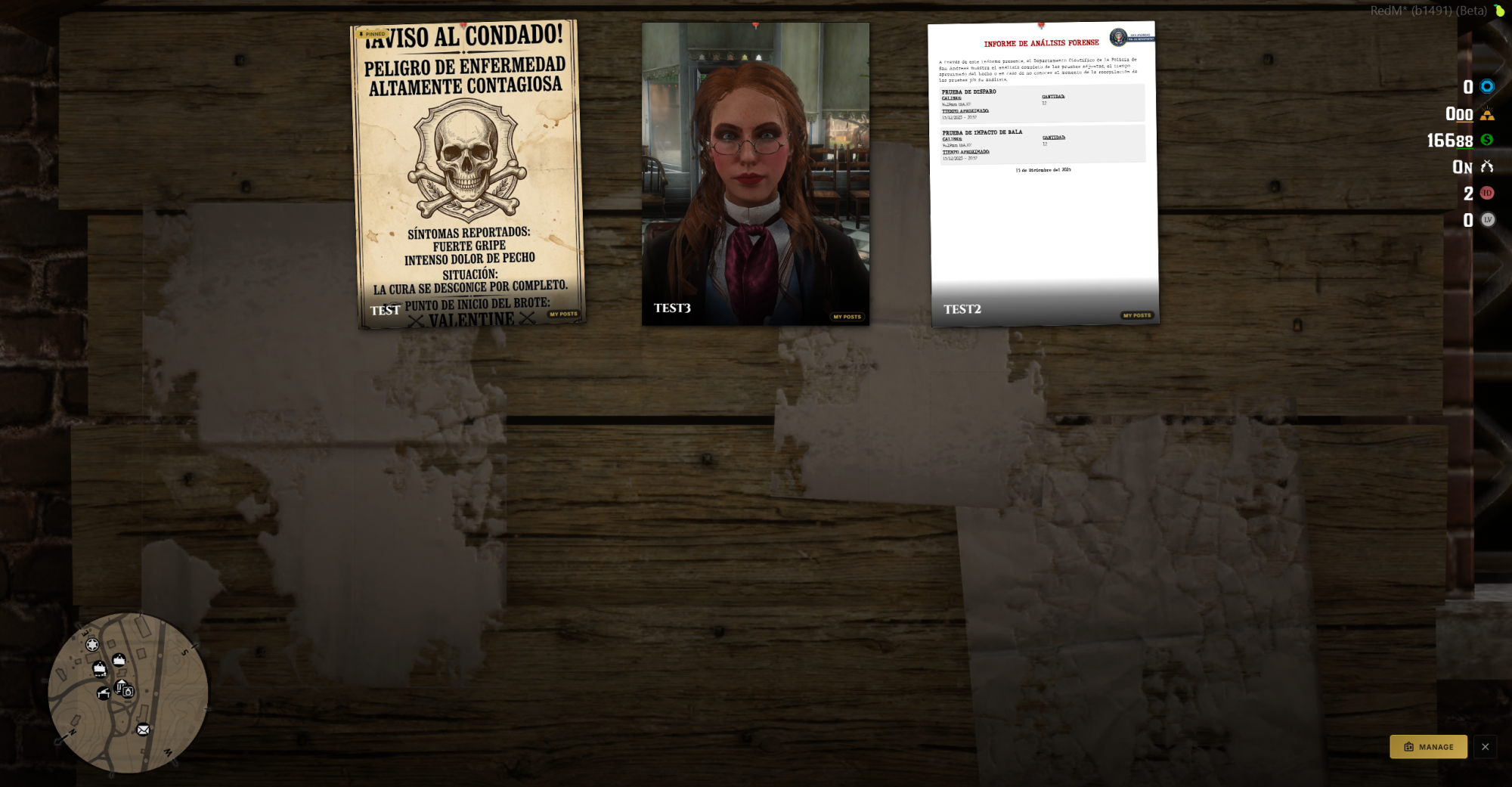
A fully immersive, pinboard system for RedM servers running VORP Core and RSG. Place physical notice boards anywhere in the world, players can walk up, read community posts, publish their own announcements, attach images, and pin important notices. Everything persists in your database and logs to Discord automatically.
Key Features
In-World Props — Fully Dynamic Spawning: Every board is a real physical object placed at configurable world coordinates. Props are streamed in and out using ox_lib's point system, they only exist near players, keeping performance clean on any server size.
Dual Interaction System: Choose how players interact with the board. Use native RedM UI Prompts, no extra dependency required, with full control over the key binding, press-or-hold behaviour, and prompt group ID. Or plug in sleepless_interact for a floating icon experience. Switch between both with a single config line.
Cinematic Board Camera: When a player opens a board, a smooth camera transition locks focus on the prop. Field of view, height, forward offset, and transition speed are all tunable from config. The camera deactivates automatically on close and on ESC.
Post Creation & Management: Players write a title, body text, and an optional image URL. Every post is tied to their character and persists in the database. Each player can manage their own posts at any time directly from the board UI.
Post Pinning: Admins can pin posts to the top of the board to highlight server-wide announcements, events, or important notices. A configurable cap limits how many pinned posts are allowed per board.
Post Expiration: Set a global expiration window in hours. Posts past their expiry are cleaned up automatically server-side every hour, keeping boards fresh without manual maintenance.
Global or Independent Boards: Run all boards from a single shared pool of posts, or give each location its own independent feed. One setting in config toggles the behaviour server-wide.
Admin Toolkit via ACE Permissions: Any player with the configured ACE node gets elevated controls — delete any post from any player, pin or unpin posts, and manage the board without restriction. Permission node is fully customizable.
Discord Webhook Integration: Every post creation and deletion fires a formatted embed to your Discord channel. Bot name, avatar, embed colour, footer text, and footer icon are all configurable. Leave the URL blank to disable entirely.
Per-Board Post Limits: Cap the number of active posts per board and per player independently. Set either to 0 for unlimited.
Multi-Language Ready: English and Spanish locales included out of the box via ox_lib's locale system. All UI text, button labels, and notifications are locale-driven. Add any language by dropping a new JSON file into the locales folder.
Unlimited Board Locations: Add as many boards as your server needs. Valentine, Rhodes, Saint Denis, Guarma — or any custom location. Each entry is a few lines in config with coords, heading, a unique ID, and an optional map blip.
Requirements
Framework: vorp_core or RSG
Database: oxmysql
Library: ox_lib
Optional: sleepless_interact (only when using sleepless interaction mode)
Installation
Place the ys_pinboard folder inside your resources directory.
Run install.sql once on your database to create the posts table.
Add ensure ys_pinboard to your server.cfg after its dependencies.
Set your board coordinates, interaction system, and notification provider in config.lua.
Start your server — boards will appear automatically.
Configuration Highlights
Interaction system toggle: 'prompt' or 'sleepless'
Prompt key, hold mode, and group ID
Global vs. per-board post feed
Post limits per player and per board
Expiration window in hours
Image domain whitelist
Discord webhook with full embed customisation
Camera FOV, offsets, and transition timing
Map blip sprite, scale, and colour
ACE permission node for admin access
Full debug mode for development


A fully immersive, pinboard system for RedM servers running VORP Core and RSG. Place physical notice boards anywhere in the world, players can walk up, read community posts, publish their own announcements, attach images, and pin important notices. Everything persists in your database and logs to Discord automatically.
Key Features
In-World Props — Fully Dynamic Spawning: Every board is a real physical object placed at configurable world coordinates. Props are streamed in and out using ox_lib's point system, they only exist near players, keeping performance clean on any server size.
Dual Interaction System: Choose how players interact with the board. Use native RedM UI Prompts, no extra dependency required, with full control over the key binding, press-or-hold behaviour, and prompt group ID. Or plug in sleepless_interact for a floating icon experience. Switch between both with a single config line.
Cinematic Board Camera: When a player opens a board, a smooth camera transition locks focus on the prop. Field of view, height, forward offset, and transition speed are all tunable from config. The camera deactivates automatically on close and on ESC.
Post Creation & Management: Players write a title, body text, and an optional image URL. Every post is tied to their character and persists in the database. Each player can manage their own posts at any time directly from the board UI.
Post Pinning: Admins can pin posts to the top of the board to highlight server-wide announcements, events, or important notices. A configurable cap limits how many pinned posts are allowed per board.
Post Expiration: Set a global expiration window in hours. Posts past their expiry are cleaned up automatically server-side every hour, keeping boards fresh without manual maintenance.
Global or Independent Boards: Run all boards from a single shared pool of posts, or give each location its own independent feed. One setting in config toggles the behaviour server-wide.
Admin Toolkit via ACE Permissions: Any player with the configured ACE node gets elevated controls — delete any post from any player, pin or unpin posts, and manage the board without restriction. Permission node is fully customizable.
Discord Webhook Integration: Every post creation and deletion fires a formatted embed to your Discord channel. Bot name, avatar, embed colour, footer text, and footer icon are all configurable. Leave the URL blank to disable entirely.
Per-Board Post Limits: Cap the number of active posts per board and per player independently. Set either to 0 for unlimited.
Multi-Language Ready: English and Spanish locales included out of the box via ox_lib's locale system. All UI text, button labels, and notifications are locale-driven. Add any language by dropping a new JSON file into the locales folder.
Unlimited Board Locations: Add as many boards as your server needs. Valentine, Rhodes, Saint Denis, Guarma — or any custom location. Each entry is a few lines in config with coords, heading, a unique ID, and an optional map blip.
Requirements
Framework: vorp_core or RSG
Database: oxmysql
Library: ox_lib
Optional: sleepless_interact (only when using sleepless interaction mode)
Installation
Place the ys_pinboard folder inside your resources directory.
Run install.sql once on your database to create the posts table.
Add ensure ys_pinboard to your server.cfg after its dependencies.
Set your board coordinates, interaction system, and notification provider in config.lua.
Start your server — boards will appear automatically.
Configuration Highlights
Interaction system toggle: 'prompt' or 'sleepless'
Prompt key, hold mode, and group ID
Global vs. per-board post feed
Post limits per player and per board
Expiration window in hours
Image domain whitelist
Discord webhook with full embed customisation
Camera FOV, offsets, and transition timing
Map blip sprite, scale, and colour
ACE permission node for admin access
Full debug mode for development
You have no favourites yet.
Loading purchases...
No purchases found for this period.